This is the starting shape for the roof, the plan of the walls. We want a roof with two roof planes, and a gable to the left and right.
This post has been moved here...
Tuesday, August 17, 2010
Creating a Dutch Gable, or Truncated Hip?
I have been on a Vectorworks chat list lately, and the users were asking about making a Dutch Gable.
Vectorworks will make one easily if you start with a standard Vectorworks roof and edit the roof plane.
This post has been moved to here...
Vectorworks will make one easily if you start with a standard Vectorworks roof and edit the roof plane.
This post has been moved to here...
Tuesday, August 10, 2010
Books are cast in stone, ebooks are wet clay
I have been listening to This Week in Google with Leo Laporte, Gina Trapani and Jeff Jarvis. Jeff Jarvis was talking about books in the old days of scribes and moveable type. He said that errors used to occur and so errata became a common way for correcting mistakes.
It seems to me that books and manuals like the ones I write, are not designed to be updated each month. Once the books have been proof read and sent to the printer, they will not be updated.
At the moment, I am updating my four major tutorial manuals so they will be ready for the next update to Vectorworks. Once completed, they will not be updated for another year. In this way these manuals are cast in stone (not easy to update).
Ebooks can be updated easily, and downloaded when you want them. If I make an error in an ebook, I can correct it and make it available to everyone. In this way an ebook is not cast in stone, it is wet clay (easily editable).
- Posted using BlogPress
It seems to me that books and manuals like the ones I write, are not designed to be updated each month. Once the books have been proof read and sent to the printer, they will not be updated.
At the moment, I am updating my four major tutorial manuals so they will be ready for the next update to Vectorworks. Once completed, they will not be updated for another year. In this way these manuals are cast in stone (not easy to update).
Ebooks can be updated easily, and downloaded when you want them. If I make an error in an ebook, I can correct it and make it available to everyone. In this way an ebook is not cast in stone, it is wet clay (easily editable).
- Posted using BlogPress
Monday, August 09, 2010
New Kindle Announced
Amazon has announced a new kindle device. This is a development of the 2nd generation Kindle device, which WILL be available in NZ, with WIFI only.
They have improved the screen, memory size, speed, button location and they added WIFI. I think these are great improvements, especially the WIFI. (this image is from the amazon web site). The overall size is slightly smaller, making it even easier to carry around.
Now that there are several Vectorworks manuals available for the Kindle, you have a good reason to buy one.
They have improved the screen, memory size, speed, button location and they added WIFI. I think these are great improvements, especially the WIFI. (this image is from the amazon web site). The overall size is slightly smaller, making it even easier to carry around.
Now that there are several Vectorworks manuals available for the Kindle, you have a good reason to buy one.
Friday, August 06, 2010
Vectorworks Manuals Available online at UK Amazon store
I have just found out that you can now get Kindle books on Vectorworks at the amazon store in the UK.
If you go to http://www.amazon.co.uk and search for Vectorworks in the Kindle store you will find several kindle books.Kindle books can be read on your Mac, PC, Kindle, iPad, iPhone and Android phone. One of the things I love abut kindle books it that you can read the same book on all these different devices, but you only have to buy the book once.
spam bastards using yousendit...
I always get spam emails and sometimes the bastards use my domain name to spam others. Today a got a new spam that I nearly opened. The subject line used yousentit.com to make it look like a genuine message for me.
When I checked the email, it was not to my correct address, so I was cautious, and I deleted it.
Thursday, August 05, 2010
Creating A Renderworks Background Makes Such a difference
I'm writing the manual for my online user group, I write a different manual for them every month. This month I writing about Rendering and Lighting.
I was showing the local Vectorworks salesman the difference a Renderworks background can make, and he was so surprised, I thought I could share it with you. When you create a rendered view without a background, you end up with a distracting white background.
Use the Resource Browser to create a Renderworks background.
One of my favorite Renderworks backgrounds is the two color.
I use a very dark blue for the first color, the top color. And I use a red or orange for the second or bottom color. This can make the background look like a sunset.
I was showing the local Vectorworks salesman the difference a Renderworks background can make, and he was so surprised, I thought I could share it with you. When you create a rendered view without a background, you end up with a distracting white background.
Use the Resource Browser to create a Renderworks background.
One of my favorite Renderworks backgrounds is the two color.
I use a very dark blue for the first color, the top color. And I use a red or orange for the second or bottom color. This can make the background look like a sunset.
Assign the background by dragging the background from the Resource Browser to the rendered scene.
When you render the scene, the results are much better, and I think this is a huge improvement.
Now, all you have to do is add a few image props of people and trees, add some street furniture and the results are really great. The bus stops in this image is from the 3D Modeling in Vectorworks 2010 manual from the Vectorworks web site. The textures and image props I covered in my user group notes a couple of months ago, which will be available on line shortly, and this month, my user group is covering lighting and rendering. You can join here....
Sunday, August 01, 2010
eBooks on the iPad - with movies
It has taken me a little while, lots of research and help from my friend Steve Scaysbrook at Konstrukshon.com to find the answer, but I have done it! I have found out how to embed movies into eBooks!
I think this is a fantastic break-through. You can now buy Vectorworks training manuals in eBook form, with movies in them. you can carry them around on your iPad, and watch the movies when ever you want. The great thing about the eBooks on the iPad, is that it is like having a book next to you. Instead of changing applications on your computer, you can keep the eBook open on your iPad and then look at the computer screen, back to the iPad, back to the computer screen and so on.
The manuals have a table of contents page that shows the cover and table of contents. The chapter headings are links to the chapters in the manual. So if you tap on a chapter, you are taken to the correct location.
When you get to the chapter you want, you might see a movie. Movies are shown in the body of the manual and they look like an image, except that the movies have a play button in the center.
When you tap on the play button, the movie starts. You can pause, fast forward or go back over the movie. With movies they don't call this fast forward anymore, the call it scrubbing.
If you pinch the movie to zoom, the movie becomes full screen, especially when you have the iPad in landscape mode.
In full screen mode ii is easier to scrub the movie forward and back, pause and play the movie, and even change the volume.
When the movie finishes, you are taken directly back to the eBook, so you can carry on reading.
I have not had success getting my eBooks on the Apple iBookstore, but there is a way around this. iTunes allows you to add eBooks to your iTunes library by dragging and dropping a downloaded eBook to the library.
Once it is in the library, tell your iPhone or iPad to sync all books. Every time you add a book to your library, it will be added to your device on the next sync.
The eBooks are very handy to carry with you. The manuals are stored in the iBooks application. Just tap on a book to open it.
You can buy my eBooks here...
I think this is a fantastic break-through. You can now buy Vectorworks training manuals in eBook form, with movies in them. you can carry them around on your iPad, and watch the movies when ever you want. The great thing about the eBooks on the iPad, is that it is like having a book next to you. Instead of changing applications on your computer, you can keep the eBook open on your iPad and then look at the computer screen, back to the iPad, back to the computer screen and so on.
The manuals have a table of contents page that shows the cover and table of contents. The chapter headings are links to the chapters in the manual. So if you tap on a chapter, you are taken to the correct location.
When you get to the chapter you want, you might see a movie. Movies are shown in the body of the manual and they look like an image, except that the movies have a play button in the center.
When you tap on the play button, the movie starts. You can pause, fast forward or go back over the movie. With movies they don't call this fast forward anymore, the call it scrubbing.
If you pinch the movie to zoom, the movie becomes full screen, especially when you have the iPad in landscape mode.
In full screen mode ii is easier to scrub the movie forward and back, pause and play the movie, and even change the volume.
When the movie finishes, you are taken directly back to the eBook, so you can carry on reading.
I have not had success getting my eBooks on the Apple iBookstore, but there is a way around this. iTunes allows you to add eBooks to your iTunes library by dragging and dropping a downloaded eBook to the library.
Once it is in the library, tell your iPhone or iPad to sync all books. Every time you add a book to your library, it will be added to your device on the next sync.
The eBooks are very handy to carry with you. The manuals are stored in the iBooks application. Just tap on a book to open it.
You can buy my eBooks here...
Friday, July 30, 2010
Short Sharp Training (Monthly) - August 2010 Lighting and Rendering in Vectorworks
I think rendering is one the really fun parts of Vectorworks. It can really look like your building is coming to life, but without good lighting, all your work can be wasted. Good lighting can even make a dull model come to life.This webinar will work though the rendering options and show you when each one should be used. Then we will look at the lighting options and see when we should be using each type. Finally we will look at a couple models and look at applying the lighting and rendering to get the best results.
Presentation 60 minutes. Q&A about 15 min.
If you are a subscriber, book your session from the links below, no cost for these webinars for subscribers.
Session 1 Monday, August 16, 2010, Time: 4:30PM - 5:30 PM NZST Register : https://www2.gotomeeting.com/register/410936562
Session 2 Wednesday, August 18 , 2010, Time: 8:30 PM - 9:30 PM NZST Register https://www2.gotomeeting.com/register/226187370
Session 3 Friday, August 20, 2010, Time: 10:00 AM - 11:00 AM NZST Register : https://www2.gotomeeting.com/register/698639667
Session 2 Wednesday, August 18 , 2010, Time: 8:30 PM - 9:30 PM NZST Register https://www2.gotomeeting.com/register/226187370
Session 3 Friday, August 20, 2010, Time: 10:00 AM - 11:00 AM NZST Register : https://www2.gotomeeting.com/register/698639667
Newsletter from Chris Brogan
There are a few business people that I listen to. Chris Brogan is one of then. I like his books, blogs and newsletters. He has started a new newsletter focusing on personal development:
Personal development. Small business development.
Sometimes it'll be marketing. Other times, it'll be ideas to improve your day. It'll be a mix.
If that's exciting to you, I'm inviting you to sign up to my new newsletter:
http://chrisbrogan.com/newsletters
- Posted using BlogPress
Personal development. Small business development.
Sometimes it'll be marketing. Other times, it'll be ideas to improve your day. It'll be a mix.
If that's exciting to you, I'm inviting you to sign up to my new newsletter:
http://chrisbrogan.com/newsletters
- Posted using BlogPress
Thursday, July 29, 2010
Viewing PDF files on iPad
I am getting closer to getting movies into my ebooks. I have successfully linked the movies in my monthly user group manuals.
To get the PDF files onto you iPad or iPhone, you use iTunes. Drag the PDF file to iTunes, and it will be added to your iTunes library. When you sync your iPhone or iPad, the pdf file will be uploaded.
This post has been moved here...
To get the PDF files onto you iPad or iPhone, you use iTunes. Drag the PDF file to iTunes, and it will be added to your iTunes library. When you sync your iPhone or iPad, the pdf file will be uploaded.
This post has been moved here...
Wednesday, July 28, 2010
3D Modeling in Vectorworks Builds trust with your Clients
I'm a huge fan of working in 3D (modeling) in Vectorworks, and I think it is one of the fun areas. But is there more to it than just having fun?
I think there are so many reasons to model your projects, that there really is no other way. Some of my clients think of plan drawing first, and then modeling, if they have time. This is so wrong. I believe they should be thinking of creating a quick model for the conceptual model, and the developed design, and then think of plan drawing (2D) for the construction drawings.
I wrote a blog recently on Conceptual Design and ran a webinar, which I recorded. The aim of the webinar was to show why it is better you create a model of your concept. It is really quick. If you watch the webinar movie, you will see that in twenty minutes I have enough information to check my concept against the set-back or recession planes, check the proximity to neighbors and create a solar study. These things are not just for fun, they help you to make a choices. You can look at these constraints and make your choices about your concept, in a very small amount of time.
How does this build trust? Well, if you were following the client's brief, but it was clearly wrong, you could use the concept model to show them why you needed to make some changes. You could show them how much better your concept would be, and you could show them with models and movies. You can take them along with you.
As the project moves into the early design phase, you should still be showing the client the model. Some of my clients create detailed models for buildings.
My clients have found that when they create rendered views of building and landscape projects, their clients respond much better to their proposals.
One of my landscape clients found that creating rendered views of projects had a huge impact on their business. Before providing rendered views, about 40% of clients would be converted from concept drawings to on-site construction. After providing rendered views, they found that 90% of clients would be converted form concepts to on-site construction. That is a 2.5x increase in on-site work, with the same number of clients.
This image is from the office of Albert van Vliet Architectural (albert@watchdog.net.nz). The building is modeled in Vectorworks 2009 and rendered in Artlantis. Albert states that when you work on a project it is essential to bring the clients along with you. The clients are often spending substantial sums of money on a building, thus they really want to know what they will be getting.
The images supplied to the clients help Albert van Vliet Architectural to develop trust with the clients. The clients no longer have to image what they are getting, they can see what they are getting. Albert reports that from a business point of view, there is no better way than modeling the buildings in 3D.
I have spoken to several clients about this topic. So far, all of them support this concept. I was chatting to a client last night and he could not believe that there was any other way to work. Using Vectorworks in 3D at the very beginning of the project may be a change in your business model, but there are many people that are already doing this. If they are in your market, they are getting better results, they are getting paid more promptly, and they are creating more trust with there clients. Can you afford not to?
If you want help moving your business to 3D, contacct me, I've helped 100's of clients.
I think there are so many reasons to model your projects, that there really is no other way. Some of my clients think of plan drawing first, and then modeling, if they have time. This is so wrong. I believe they should be thinking of creating a quick model for the conceptual model, and the developed design, and then think of plan drawing (2D) for the construction drawings.
I wrote a blog recently on Conceptual Design and ran a webinar, which I recorded. The aim of the webinar was to show why it is better you create a model of your concept. It is really quick. If you watch the webinar movie, you will see that in twenty minutes I have enough information to check my concept against the set-back or recession planes, check the proximity to neighbors and create a solar study. These things are not just for fun, they help you to make a choices. You can look at these constraints and make your choices about your concept, in a very small amount of time.
How does this build trust? Well, if you were following the client's brief, but it was clearly wrong, you could use the concept model to show them why you needed to make some changes. You could show them how much better your concept would be, and you could show them with models and movies. You can take them along with you.As the project moves into the early design phase, you should still be showing the client the model. Some of my clients create detailed models for buildings.
My clients have found that when they create rendered views of building and landscape projects, their clients respond much better to their proposals.
One of my landscape clients found that creating rendered views of projects had a huge impact on their business. Before providing rendered views, about 40% of clients would be converted from concept drawings to on-site construction. After providing rendered views, they found that 90% of clients would be converted form concepts to on-site construction. That is a 2.5x increase in on-site work, with the same number of clients.
This image is from the office of Albert van Vliet Architectural (albert@watchdog.net.nz). The building is modeled in Vectorworks 2009 and rendered in Artlantis. Albert states that when you work on a project it is essential to bring the clients along with you. The clients are often spending substantial sums of money on a building, thus they really want to know what they will be getting.
The images supplied to the clients help Albert van Vliet Architectural to develop trust with the clients. The clients no longer have to image what they are getting, they can see what they are getting. Albert reports that from a business point of view, there is no better way than modeling the buildings in 3D.
I have spoken to several clients about this topic. So far, all of them support this concept. I was chatting to a client last night and he could not believe that there was any other way to work. Using Vectorworks in 3D at the very beginning of the project may be a change in your business model, but there are many people that are already doing this. If they are in your market, they are getting better results, they are getting paid more promptly, and they are creating more trust with there clients. Can you afford not to?
If you want help moving your business to 3D, contacct me, I've helped 100's of clients.
Friday, July 16, 2010
Short Sharp Training (Monthly) - July 2010 Creating a Plumbing Schematic in Vectorworks - Feedback
The feedback this month was very pleasing. I've had a few people just send me thank-you's for the training this month. The funny thing was, I was concerned that I had covered enough information to keep every one occupied for the hour online. As it turned out, we used any extra time with other questions and answers.
In one meeting, the people online wanted to discuss creating a Vectorworks library, and we ended up talking about adding extra tools to your Vectorworks, and where to find the tools in Vectordepot.com. Some of the tools are mine, and freely available at vectordepot. One of the online users, Steve, made a list of useful things he learned at the meeting, and he has allowed me to post a copy of his list. Steve got 6 useful tips from the session, which he says more than pays for the cost and the time spent.
Two other users just emailed me out of the blue to say thanks, what a great session...
Join these users each month and learn to use Vectorworks better.
In one meeting, the people online wanted to discuss creating a Vectorworks library, and we ended up talking about adding extra tools to your Vectorworks, and where to find the tools in Vectordepot.com. Some of the tools are mine, and freely available at vectordepot. One of the online users, Steve, made a list of useful things he learned at the meeting, and he has allowed me to post a copy of his list. Steve got 6 useful tips from the session, which he says more than pays for the cost and the time spent.
Two other users just emailed me out of the blue to say thanks, what a great session...
Join these users each month and learn to use Vectorworks better.
Friday, July 09, 2010
Archoncad search page for Vectorworks resources
Archoncad search page
I have been creating a lot of blogs, YouTube movies, user group notes and movies of the last six years. This has given me a Challenge keeping track of all the resources. At the start it was easy, but now, there are over a hundred movies on YouTube, thousands of posts, over 60 Short Sharp Training manuals, and over a thousand movies.
I was having trouble remembering what I had covered, and my user group subscribers were having trouble finding their way around all the resources. I started with a filemaker database for myself, and thought about giving it away. Then, I thought it would be better to make it web based. Everyone can get to it and I can update it when ever I want. The result is my new search page
learn.archoncad.com
I have been creating a lot of blogs, YouTube movies, user group notes and movies of the last six years. This has given me a Challenge keeping track of all the resources. At the start it was easy, but now, there are over a hundred movies on YouTube, thousands of posts, over 60 Short Sharp Training manuals, and over a thousand movies.
I was having trouble remembering what I had covered, and my user group subscribers were having trouble finding their way around all the resources. I started with a filemaker database for myself, and thought about giving it away. Then, I thought it would be better to make it web based. Everyone can get to it and I can update it when ever I want. The result is my new search page
learn.archoncad.com
Thursday, July 08, 2010
off the grid timber frame building created in Vectorworks
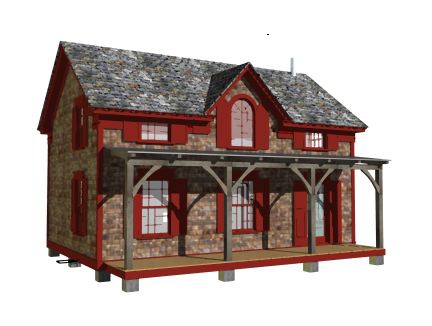
I always love looking at these images of heavy timber construction from webnash. The webnash founder, Michael Erkkinen, has been designing and building houses in Vectorworks, using the modeling tools to create his frames, ever since he got my 3D Modeling book from NNA.
This is the rendered view from Vectorworks. (from the webnash web site)
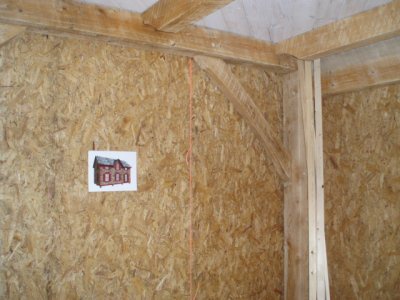
So, every time Michael posts a blog about one is his buildings, I like to read about it and see what he is up to. I was interested in this view, you can see the rendered model stuck on the wall so everyone knows what the building should look like (image from the webnash web site).
I especially like to read about Michael's building technology. He is interested in buildings that have a long life, that look after the occupants, and buildings that can generate their own energy.
Well done Michael, keep up the good work.
You can read the blog, and see all the other photos at the webnash web site...
This is the rendered view from Vectorworks. (from the webnash web site)
So, every time Michael posts a blog about one is his buildings, I like to read about it and see what he is up to. I was interested in this view, you can see the rendered model stuck on the wall so everyone knows what the building should look like (image from the webnash web site).
I especially like to read about Michael's building technology. He is interested in buildings that have a long life, that look after the occupants, and buildings that can generate their own energy.
Well done Michael, keep up the good work.
You can read the blog, and see all the other photos at the webnash web site...
Tuesday, July 06, 2010
Vectorworks ebooks on the iPad
The iPhone screen is just too small for me. The screen size is acceptable for reading a novel, but it is just too small for reading a tutorial manual that has screen shots in it. Sure, you can make the images bigger by pinching, but then you can't see the words.
The Kindle device is limited by the screen size and display. It has a greyscale display that makes it hard to see screen shots clearly. I can kind-of make them out, but they lack real clarity. The screen size is much better than the iphone, but it is not as good as the iPad. PDF's on the kindle are hard to read, mainly because of the greyscale screen and the lack of a touch screen for zooming.
There is a kindle book reader for the iphone, iPad, Blackberry, PC and Mac. This means that any kindle books you buy, can be read on several devices. So, while the kindle device is limited, any books you buy for the kindle will be useful an many devices.
The iPad... there is so much to say about the iPad. The iPad has a decent sized screen. You can read Kindle books, ibooks, PDF's and so on. The touch screen is very easy to use, and before you know it you expect all computers to work with such ease.
Ebooks on the iPad look great. When you open then in landscape mode, you get two pages next to each other. If the books are formatted correctly, you can get the cover and table of contents next to each other.
When you get into the book, you get two pages next to each other. The text is clear, the images are clear. If you drag your finger along the bottom, you can see the chapter and page numbers. When you release your finger, the book jumps to that page.
You can't make the images bigger, which I think is a shame.
Unless you write your own books, you have to buy books from the Apple iBookstore. At present, there are no Vectorworks books available on the iBookstore. I have tried, but they are not showing up. You can buy Vectorworks manuals at www.lulu.com.
PDF's in ibook look very good, and these you can zoom. This is an image from one of my monthly manuals, the June 2010 edition. The text is clear and very readable. If you want, you can zoom the PDF to make it easier to read.
If you copy the PDF files to your iTunes library, they will be copied to iBooks. You could add all the monthly manuals to your iTunes library so you can read the manuals away from your computer.
The manuals tend to be small enough to copy quickly, and not take up too much of your valuable storage space. They display the text and graphics clearly. And if you need to, you can zoom the page to make it bigger.
You can see thumbnails of all the pages as well. This makes it easy to jump to different parts of the manual. When you tap on one of the thumbnails, iBook will jump to that page.
Kindle On The iPad
As I said earlier, the great thing about buying a Kindle book is that any books you buy can be read on many devices. The iPad is just one device.
The Kindle bookstore has so many books, and you can get Vectorworks manuals there too.
The Vectorworks manuals look great on the big screen of the iPad. The images are in color, you can see a whole page, and you can pinch the images to make them bigger.
If you make the iPad landscape, you do not get two pages, you still get the one page, but it is wider.
The iPad... there is so much to say about the iPad. The iPad has a decent sized screen. You can read Kindle books, ibooks, PDF's and so on. The touch screen is very easy to use, and before you know it you expect all computers to work with such ease.
Ebooks on the iPad look great. When you open then in landscape mode, you get two pages next to each other. If the books are formatted correctly, you can get the cover and table of contents next to each other.
When you get into the book, you get two pages next to each other. The text is clear, the images are clear. If you drag your finger along the bottom, you can see the chapter and page numbers. When you release your finger, the book jumps to that page.
You can't make the images bigger, which I think is a shame.
Unless you write your own books, you have to buy books from the Apple iBookstore. At present, there are no Vectorworks books available on the iBookstore. I have tried, but they are not showing up. You can buy Vectorworks manuals at www.lulu.com.
PDF's in ibook look very good, and these you can zoom. This is an image from one of my monthly manuals, the June 2010 edition. The text is clear and very readable. If you want, you can zoom the PDF to make it easier to read. If you copy the PDF files to your iTunes library, they will be copied to iBooks. You could add all the monthly manuals to your iTunes library so you can read the manuals away from your computer.
The manuals tend to be small enough to copy quickly, and not take up too much of your valuable storage space. They display the text and graphics clearly. And if you need to, you can zoom the page to make it bigger.
You can see thumbnails of all the pages as well. This makes it easy to jump to different parts of the manual. When you tap on one of the thumbnails, iBook will jump to that page.
Kindle On The iPad
As I said earlier, the great thing about buying a Kindle book is that any books you buy can be read on many devices. The iPad is just one device.
The Kindle bookstore has so many books, and you can get Vectorworks manuals there too.
If you make the iPad landscape, you do not get two pages, you still get the one page, but it is wider.
Book Shelf for Vectorworks
I have been really fortunate to have a review copy of book shelf from VectorDepot. This is now in my Vectorworks and I use it all the time.
Bookshelf is a plugin for Vectorworks. You have to add it to your plug-ins folder, and then add it to your workspace. This takes about 30 seconds to complete, and is very straightforward.
When I first got book shelf, I was impressed, but it hadn't dawned on me just how useful it can be. You see Bookshelf stores files and web site locations for you. Not just Vectorworks files either. I found that I can store PDF files, Vectorworks files, photoshops files and more. when you open these files with Bookshelf, your computer will open the file with the correct application. So, my PDF flies open with Acrobat Reader, the image files open with photoshop and so on.
For example, if you are designing a brick house, you could set up a library that had your typical brick details file, links to web sites that had brick cladding details, links to web sites that had brick textures, and you could include the pdf files for the structural codes for a brick building.
When you work on a brick project, you would have quick access to all the codes, textures, websites, details and so on that you need. this is a real time saver for me. I have so much stuff on my computer, I can never remember where I've put everything.
Bookshelf has been a real time saver, and I'm not going to use Vectorworks with out it. I highly recommend bookshelf, go buy it.
Bookshelf is a plugin for Vectorworks. You have to add it to your plug-ins folder, and then add it to your workspace. This takes about 30 seconds to complete, and is very straightforward.
When I first got book shelf, I was impressed, but it hadn't dawned on me just how useful it can be. You see Bookshelf stores files and web site locations for you. Not just Vectorworks files either. I found that I can store PDF files, Vectorworks files, photoshops files and more. when you open these files with Bookshelf, your computer will open the file with the correct application. So, my PDF flies open with Acrobat Reader, the image files open with photoshop and so on.
For example, if you are designing a brick house, you could set up a library that had your typical brick details file, links to web sites that had brick cladding details, links to web sites that had brick textures, and you could include the pdf files for the structural codes for a brick building.
When you work on a brick project, you would have quick access to all the codes, textures, websites, details and so on that you need. this is a real time saver for me. I have so much stuff on my computer, I can never remember where I've put everything.
Bookshelf has been a real time saver, and I'm not going to use Vectorworks with out it. I highly recommend bookshelf, go buy it.
Monday, July 05, 2010
Short Sharp Training (Monthly) - July 2010 Creating a Plumbing Schematic in Vectorworks
Creating a Model of Plumbing Schematic
More of my clients are being asked for a 3D presentation of a plumbing schematic. If you create the building as a model, with the correct symbols, layers and classes, this can be straightforward to create. We will need to look at how to make your symbols work for you, how to structure your layers and classes, how to create the pipework and and how to set up a drawing to show the schematic.
Book now for the online sessions in July 2010.
Session 1 Monday, July 12, 2010, Time: 4:00 PM - 5:00 PM NZST Register : https://www2.gotomeeting.com/register/368404714
Session 2 Wednesday, July 14, 2010, Time: 8:30 PM - 9:30 PM NZST Register https://www2.gotomeeting.com/register/436411666
Session 3 Friday, July 16, 2010, Time: 9:30 AM - 10:30 AM NZST Register : https://www2.gotomeeting.com/register/469219778
Presentation 60 minutes. Q&A about 15 min.
Cost : You have to be a subscriber to join this webinar.
More of my clients are being asked for a 3D presentation of a plumbing schematic. If you create the building as a model, with the correct symbols, layers and classes, this can be straightforward to create. We will need to look at how to make your symbols work for you, how to structure your layers and classes, how to create the pipework and and how to set up a drawing to show the schematic.
Book now for the online sessions in July 2010.
Session 1 Monday, July 12, 2010, Time: 4:00 PM - 5:00 PM NZST Register : https://www2.gotomeeting.com/register/368404714
Session 2 Wednesday, July 14, 2010, Time: 8:30 PM - 9:30 PM NZST Register https://www2.gotomeeting.com/register/436411666
Session 3 Friday, July 16, 2010, Time: 9:30 AM - 10:30 AM NZST Register : https://www2.gotomeeting.com/register/469219778
Presentation 60 minutes. Q&A about 15 min.
Cost : You have to be a subscriber to join this webinar.
Friday, July 02, 2010
Retrieving a Corrupt File and Backing Up
I've just had an email from a client, they have trouble with a corrupt file and their backup system is not working. I feel for my client, it is never nice being in that situation.
I have written a manual that would really help, (Saving a Corrupt File) which i have now sent. But, if my client had read this manual earlier, they would have had all the backups they need, and they wouldn't need to retrieve the lost file.
- Posted using BlogPress from my iPhone
I have written a manual that would really help, (Saving a Corrupt File) which i have now sent. But, if my client had read this manual earlier, they would have had all the backups they need, and they wouldn't need to retrieve the lost file.
- Posted using BlogPress from my iPhone
Wednesday, June 30, 2010
Novedge online Webinar Series 004 - Quick Concept Design in Vectorworks
Today we had our last online webinar in the Novedge Webinar series, covering How to Create a Quick Concept Design.
Vectorworks has several, very cool, techniques that can be used together to create a very fast concept design. If you can create a quick conceptual design, you can improve the quality of your work though 3D visualization, solar studies and checking your concept against site restrictions.
Although the title is residential concept design, you can use these techniques for larger projects as well.
Video of webinar:
Vectorworks has several, very cool, techniques that can be used together to create a very fast concept design. If you can create a quick conceptual design, you can improve the quality of your work though 3D visualization, solar studies and checking your concept against site restrictions.
Although the title is residential concept design, you can use these techniques for larger projects as well.
Video of webinar:
Quick Concept Design in Vectorworks from Jonathan Pickup on Vimeo.
Subscribe to:
Comments (Atom)