Pages

Showing posts with label stories. Show all posts

Friday, January 27, 2017

epodcast191 - Story Levels With Symbols

epodcast191_Story_Levels_for_Symbols

This is a new technique in Vectorworks 2017. You can use a level to control the insertion point of a symbol. In this example I have a symbol for a power outlet with a 3D component. If you create a level for this symbol, you can set the height of the symbol using the level. When you need to change the elevation of all the power outlet in that story, change the level elevation. All the power sockets on that story will update.

Read more...

Thursday, April 02, 2015

Vectorworks Tip #238- Levels and Simple Walls

Levels can be used to control the elevations of walls. If you set up the required levels, you can use the Object Info palette to connect the walls to the levels. If you change the level elevations, it will update the walls.

Friday, March 27, 2015

Vectorworks Tip #234 - Levels and Stairs

When you create your stairs, you can choose to connect the start (bottom step) and the end (top step) of your stair to levels. This will allow you to create several levels to control the starting and stopping of stairs so that they matched the various levels in your project.

Thursday, March 12, 2015

Vectorworks Tip #230 - Stories and Levels - Slab Levels

Levels can be used to control the setting out of your slabs (the Z reference level). If you set this up carefully, this can be a very powerful setting to automatically control the height of your ceiling relative to the structural objects.

Thursday, March 05, 2015

Vectorworks Tip #226 – Stories and Levels – Levels and Columns

Levels can be used to control the bottom bound and the top bound of columns. The levels can be in the current story, in the story above (the top of a column), or the story below (for the bottom of the column). This gives you a lot of flexibility to control the height of your columns automatically.

Thursday, February 26, 2015

Vectorworks Tip #222 – Stories and Levels – Creating New Levels

If you want to create new levels, click on the New Level… button. You can create as many levels as you need to complete your design. Keep the level names short and concise.

Thursday, February 19, 2015

Vectorworks Tip #218 – Stories and Levels – Editing Default Levels

If you do not like the names of the standard design layers and levels in your story set up dialog box, you can edit them by clicking on the Edit Default Levels… This dialog box allows you to change the default layer names, level names and level elevations for the current project, but these do not change the overall default layers and levels for every project.

Thursday, February 12, 2015

Vectorworks Tip #214 - Stories and Levels - Default Levels

Vectorworks comes with standard design layer and level settings. These design layers and levels can be used in your building projects to control the elevations of the building elements, especially walls and wall components.

Thursday, February 05, 2015

Vectorworks Tip #210 - Stories and Levels


Design layers might be the container for holding all of the building elements, but levels control the elevation of these elements.

the leader in Vectorworks training: http://learn.archoncad.com

Thursday, January 22, 2015

cadmovie1501_07 – Stories, Layers and Levels – Part 7

Complex Wall Style When it comes to creating a more complex wall style, it is very important that you have already created all of the levels that you need. This image shows a more complex wall style already created. You … Continue reading visit http://ift.tt/1hjblTM

cadmovie1501_05 – Stories, Layers and Levels – Part 5

Creating Stories, Layers, and Levels If you understand how your levels can be used, then it is time to create your stories, layers and levels. To do this you can use the Organization dialog box. level-archoncad-subscription] [/level-archoncad-subscription] Previous cadmovie Next … Continue reading visit http://ift.tt/1hjblTM

Vectorworks Tip #202 – What are Stories?

Stories are a collection of settings that control the elevations of your building projects. I used to say that stories are a collection design layers, but with Vectorworks 2015, this is not correct. Stories are made up of design layers … Continue reading visit http://ift.tt/1hjblTM

Wednesday, January 21, 2015

cadmovie1501_02 – Stories, Layers and Levels – Part 2

How Layers, Levels and Stories Work Together There is a hierarchy to the structure of layers, levels and stories. Stories control the overall building setup – the heights between the floors of the building. When you are setting up a … Continue reading visit http://ift.tt/1hjblTM

Sunday, January 11, 2015

SST_1501- Layers, Levels, and Stories

Design layers are one of the fundamental organizing concepts in Vectorworks, They are used to break the design into manageable chunks but they should not be confused with classes. Use design layers of and classes to create the structure for … Continue reading visit http://ift.tt/1hjblTM

Saturday, February 08, 2014

cadmovie1022 – Introduction to BIM – Part 2

Layers and stories are the keystones of your BIM workflow. Layers are used to divide the project and stories are used to group layers. Stories are an organizing concept that groups design layers to make it easy to adjust different … Continue reading visit http://ift.tt/1hjblTM

Wednesday, December 11, 2013

Setting up Layers and Stories for Buildings in Vectorworks


Setting up your layers correctly is essential if you want to use Vectorworks for BIM. Vectorworks from 2012 onwards has an organizing concept called Stories which will require you to think carefully about how you organise your project into layers and stories. It groups design layers to make it easier to adjust the different levels (stories) of a building. The stories also allow you to control building elements such as stairs, walls, and so on.  

What Are Stories?
Stories is a way to control the layers that make up a building, grouping design layers together into levels of the building. They make it easy to adjust the elevations of  all the levels of of the building, because Vectorworks knows how the stories relate to each other. 

You should use Stories to control the elevation heights, design layers for modeling, and classes to control the visibility and graphic style of an object. If you are not familiar with layers and classes, please refer to the Vectorworks Essential Manual, which has a series of exercises to explain these. 
Classes have not changed with the new Stories concept. 
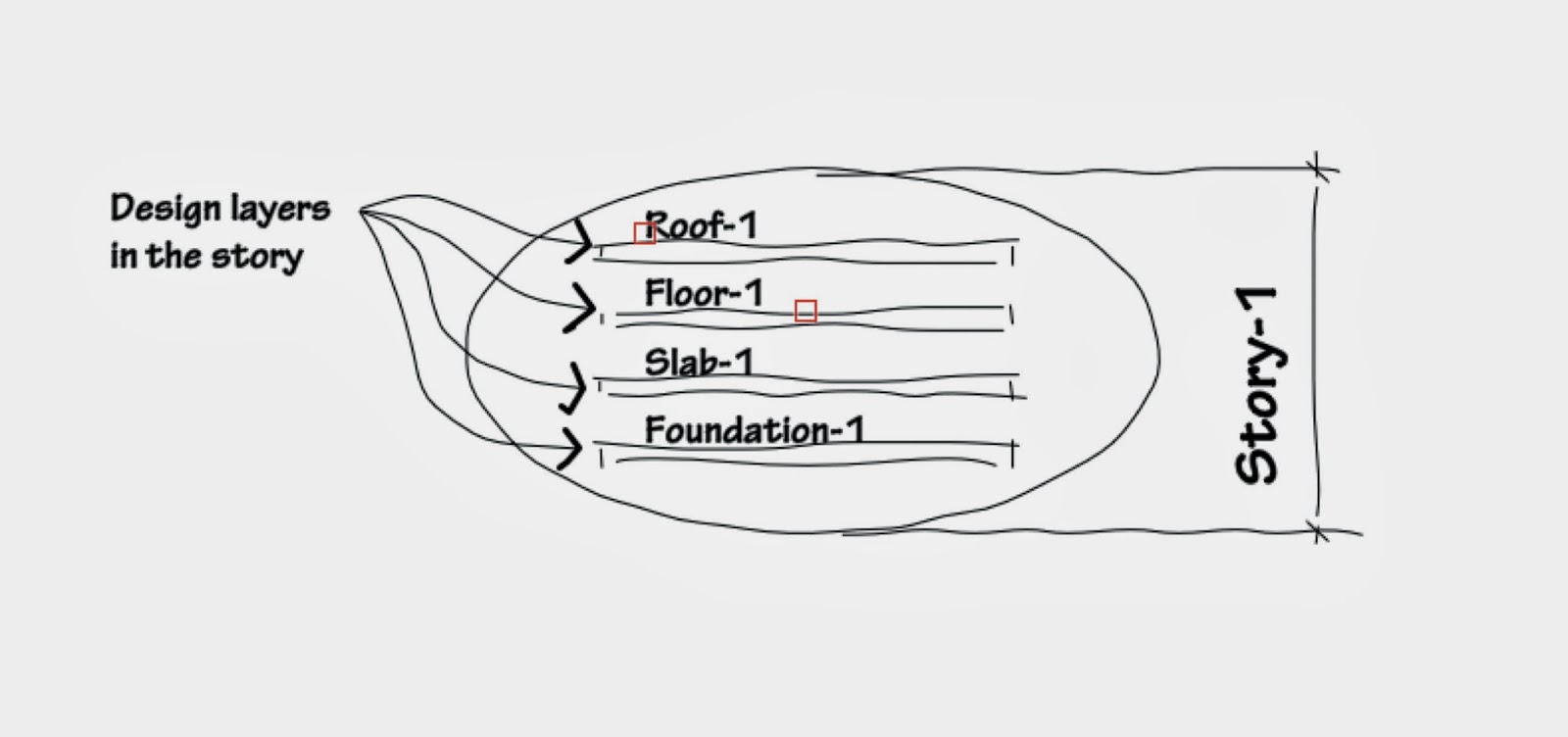
A story is a collection of design layers (foundation, slab, walls, and ceiling, and so on) that make up make up an entire level or floor of a building. The story settings control the elevation of each story relative to the other stories. 


When you have two or more stories, you have two collections of design layers. The story concept is flexible, and you can elect to use several design layers in one story. The settings of each story are relative to each other. When you change the elevation of one story, you can choose to adjust other stories above or below. 

If you have a multi-story building, each story is a collection of design layers. Only work with the absolute minimum of layers in a story.


How do Stories Work With Building Elements?
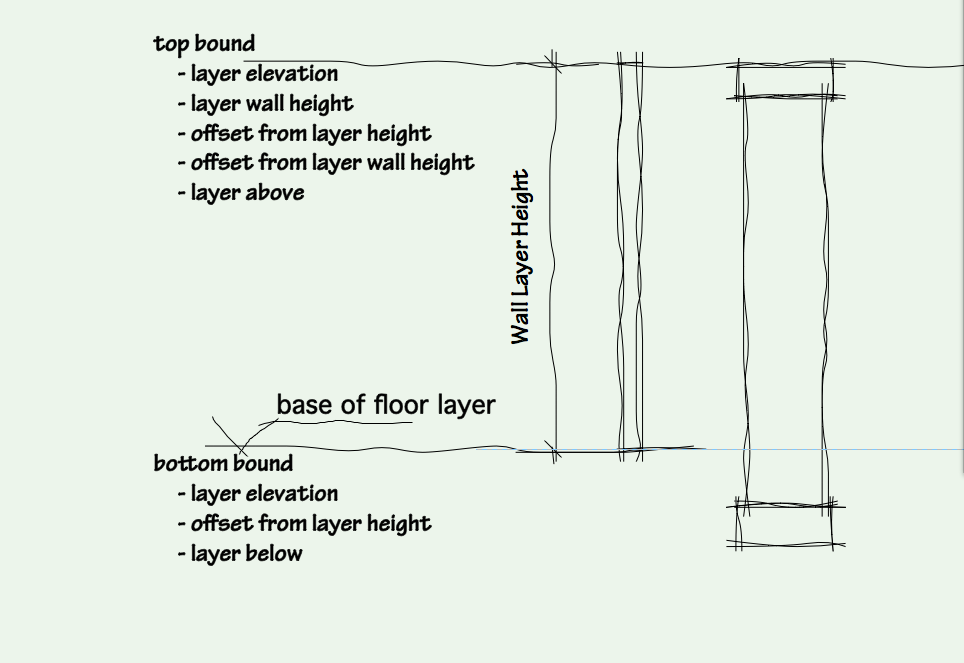
The real power of stories becomes obvious when you start using stories with building elements such as walls, stairs, and so on. You can link the top boundary to a layer floor above. You can link the bottom boundary to a layer below.  

When you edit the stories, and move the floor above, the objects bounded to layers above will automatically adjust. You have several options for linking the top and bottom boundaries of building elements. Beware, objects on one story do not adjust to (changed) geometry on another story but to the (changed) settings of that story!